Lot up, sell, invoice and settle with vendors from one system. It keeps working when the venue has no reception.
No percentage of your sales.
Owned and built in Australia.
Pricing is by quote.
| Lot | Item | Qty | Price | Bidder |
|---|---|---|---|---|
| 14 | Round bale feederWaiting to sync | 1 | $420 | 31 |
| 15 | Pallet of steel fence postsWaiting to sync | 1 | $260 | 8 |
| 16 | Welder, 250 ampWaiting to sync | 1 | ||
| 17 | Two stroke chainsawWaiting to sync | 1 |
No signal. 2 lots are saved on this device and waiting to sync.
Example lots, prices and bidder numbers. The sheet mirrors the lots app: sales are saved on the device, and Sync sends them up whenever the device can reach the server.
What the sale includes
Everything between lotting up and the vendor statement, in one system built for in-person sales: clearing sales, livestock, machinery, vehicles and equipment.
Offline sale day
Details on Offline sale dayLot up and record sales on a phone or tablet with no connection. Press Sync when the device can reach your SoldTo server.
Tax invoices
Details on Tax invoicesA Tax Invoice for every bidder, with ABN, GST, buyer’s premium, part payments and an optional card surcharge.
Vendor statements
Details on Vendor statementsGross proceeds, commission, expenses and nett proceeds for each vendor, as a PDF with an optional cover letter.
Printing on site
Details on Printing on sitePrint invoices to a network printer on site, one to four copies each. Run sheets and reports open as PDFs.
Run sheet and reports
Details on Run sheet and reportsA printable run sheet for the day, then reports on lot sales, payments by method and bidders who still owe.
What comes out of the printer
Each bidder gets a Tax Invoice. Each vendor gets a statement that shows how their proceeds were worked out.
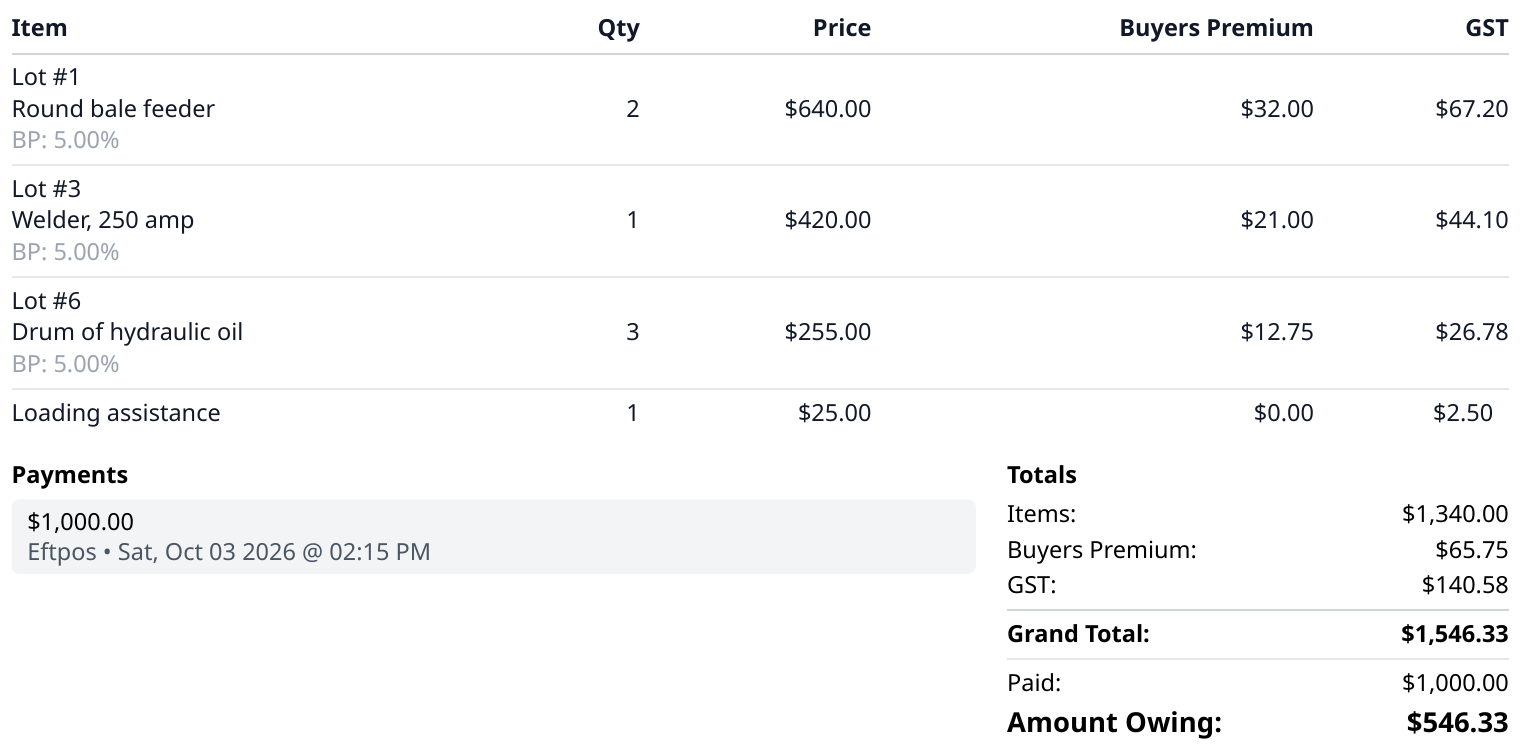
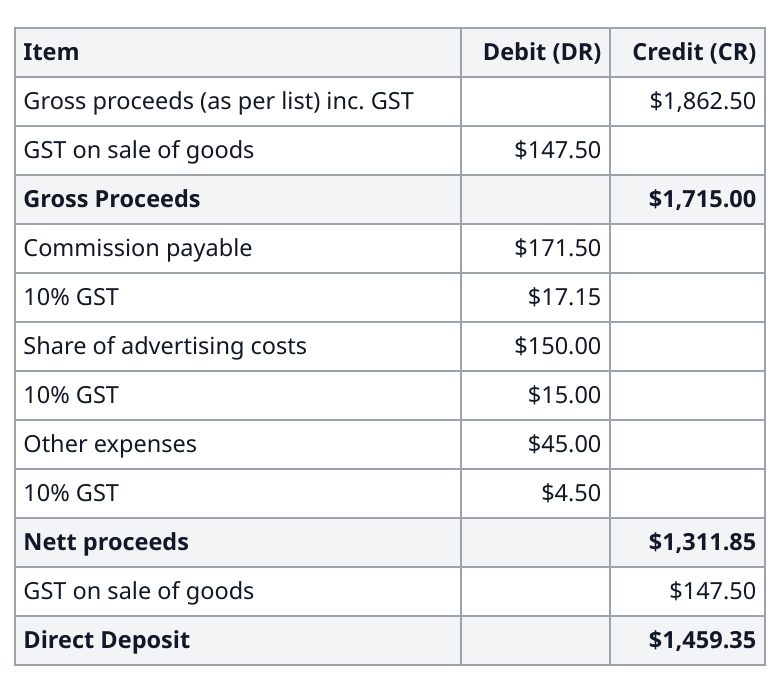
A sale from start to statement
Set up the sale, add vendors, bidders and lots, and set commission, buyer’s premium and GST. Print a run sheet with blank columns for handwriting.
Clerks record each lot as Sold, Sold With, Passed In or No Bids on a phone or tablet. Recording a lot does not need a connection.
Sync to the SoldTo server, generate invoices, record payments, then produce vendor statements and reports.
SoldTo is quoted on what your business needs. It takes no share of what you sell.
- PricingBy quote
- Share of salesNone
- Owned and built inAustralia
Sold in person
Bidders bid with the auctioneer at the sale, and clerks record each result on a phone or tablet.
Sync when you are in range
Clerks keep selling with no signal. When a device is back in range of the SoldTo server, the clerk presses Sync and the sales go up.
Payments recorded as taken
Staff record what each bidder pays on the day: cash, cheque, credit or debit, and Eftpos.
Say what you sell, how many lots a sale runs to, and where your venues are short on signal. We will reply with how SoldTo would handle it, and a quote.